LogoLogo
Ctrlk
  • Waterwatch User Guide
  • FAQs
  • Get Started
    • Account Sign Up
    • Download The App
    • Existing Account? Add a new monitor
  • Installation Guides
  • Battery Replacement Guides
  • Installation Guides - Tank Monitors
  • Tank Monitor - Positioning
  • Hole Saw Options
  • Installation Guides - Environmental Monitors
  • Mobile App
  • Enable Notifications
  • Connect to your monitor with bluetooth
  • Setting Alarms
  • Reboot
  • Share Access
  • Advanced Settings
  • Diagnostics
  • Remove A Tank/Monitor
  • Measurement Errors
  • Hardware and Maintenance
    • Maintaining Your Sensor
      • Battery Replacement (all models after Oct 2022 except external antenna)
      • Battery Replacement - LS1R External Antenna (after October 2022)
      • T35 Battery Replacement (before Oct 2022)
      • LS1R Battery Replacement (before Oct 2022)
      • Upgrade LS1 to LS1R X
      • Upgrade T35 to T35-X
    • Firmware Updates
  • Waterwatch Web App
    • Account
    • Waterwatch Live
    • Organisations
  • SUPPORT
    • Valid Sensor Ranges
    • Trouble Shooting
    • Get In Touch
    • Network Coverage
    • Major Firmware Releases
    • Technical Documents
  • Advanced
    • Delta Filter Setting
    • Archive
Powered by GitBook
On this page
  1. Hardware and Maintenance
  2. Maintaining Your Sensor

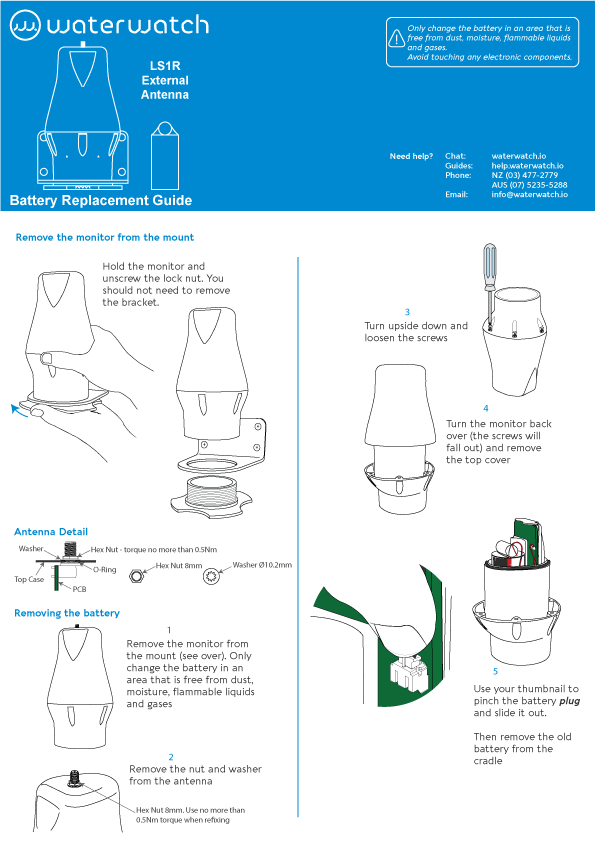
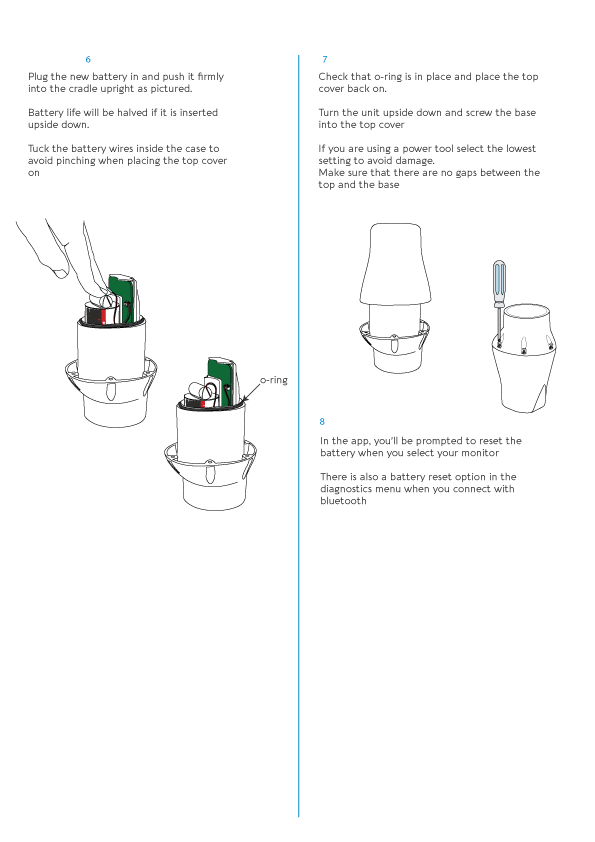
Battery Replacement - LS1R External Antenna (after October 2022)

271KB
Battery Replacement LS1R EX ANT.pdf
PDF
Open
PreviousBattery Replacement (all models after Oct 2022 except external antenna)NextT35 Battery Replacement (before Oct 2022)

Last updated 2 years ago

Was this helpful?

Was this helpful?